Digital Business Cards for Trade Shows: QR, NFC and Lead Capture
At a trade show, a business card's real job is to make each conversation easy to follow up afterwards. Here is how to prepare before the show, where QR codes and NFC cards belong on the stand, how to collect visitor details with consent and what to measure afterwards.
Short Answer
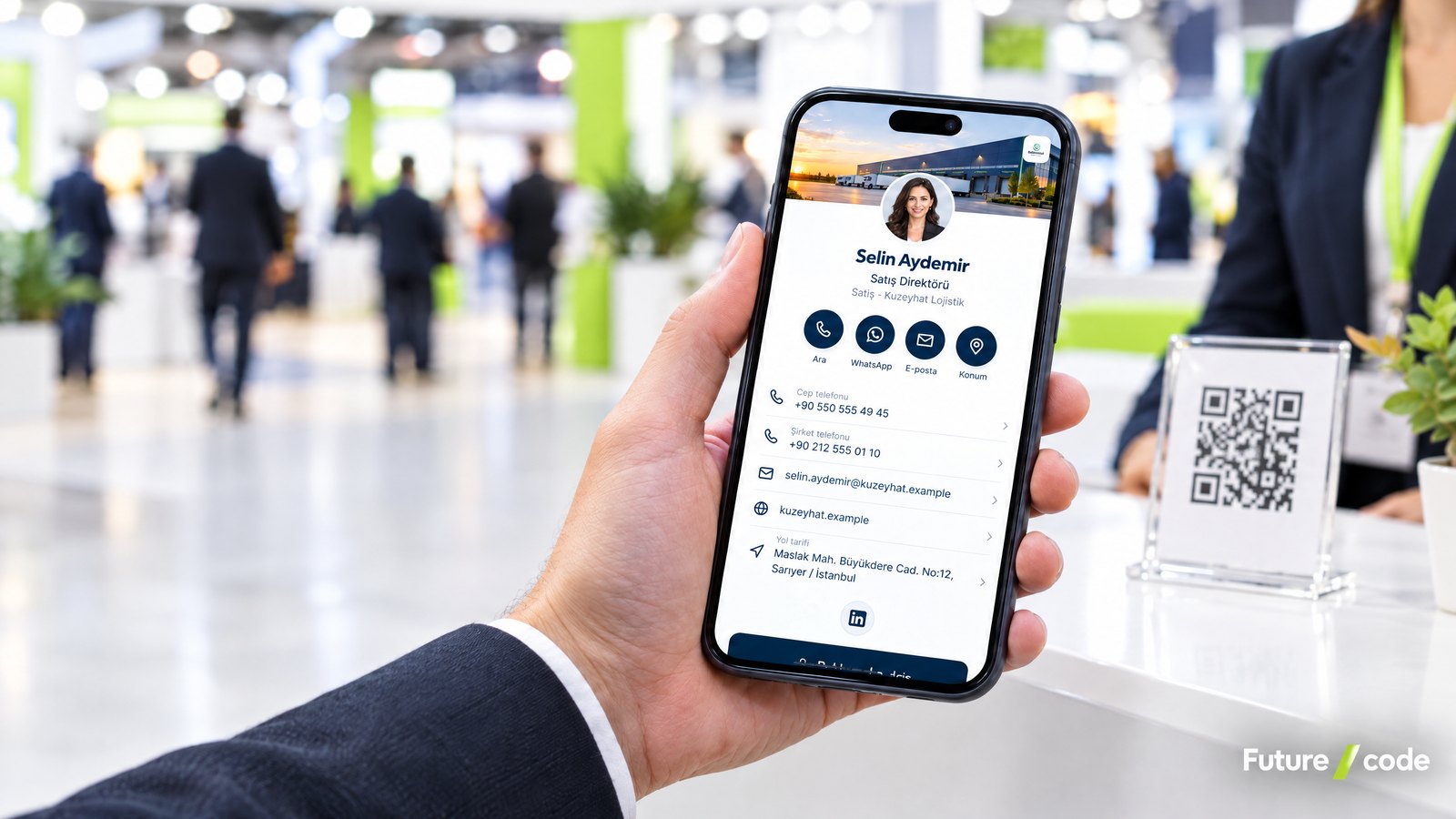
A trade show digital business card lets your stand team pass their contact details to a visitor’s phone through a QR code or an NFC card, and lets interested visitors leave their own details with explicit consent. Before the show, each team member’s card is prepared and the QR card images are printed; at the stand, QR codes sit on badges, desks and screens while NFC cards are tapped in conversation; after the show, the visitors who left their details are followed up and you can see how many views came from each source. Futurecode’s Vizitwerk digital business card platform is built to run all three stages from one panel.
What Is a Business Card Really For at a Trade Show?
A digital business card is a small web page with your contact details that opens on a phone, reached through a QR code or an NFC card. We cover how it works, including vCard and dynamic QR codes, in our guide to digital business cards with QR codes. This article focuses only on the trade show scenario.
A trade show is where business cards are used most and lost most. Your stand team has many short conversations all day, and each visitor walks past dozens of stands. By the evening the visitor has a stack of cards in their bag and your desk has a box of collected ones. Handing out cards is not the hard part; the hard part is which conversations are remembered and followed up afterwards.
So at a trade show a business card has three jobs:
- Fast exchange: On a busy stand, details should reach the visitor’s phone in seconds, ideally straight into their contacts.
- Two-way contact: Not only your details should travel; the interested visitor’s details should reach you too.
- Measurement: After the show you should be able to see how far the stand reached, whose cards were opened and which sharing method worked.
A printed card only covers the first job, and only partly. A digital card supports all three, and when it is set up properly your stand becomes a contact collection point.
Printed Cards, QR Codes and NFC at a Trade Show
Rather than betting on one method, it helps to know where each one is strong:
| Trade show need | Printed card | Digital card via QR code | NFC card |
|---|---|---|---|
| Speed in a crowd | Quick to hand over, but the visitor types the details in later | Scanned with the camera, opens in the browser | Phone is held near the card, the card opens |
| Saving to contacts | Typed in by hand, or forgotten | One tap via vCard | One tap via vCard |
| Reading from a distance | Not possible | Can be scanned from a stand panel or screen | Needs close contact |
| Phone compatibility | No phone needed | Almost any phone with a camera | Phones with NFC support switched on |
| Stock and changing details | Stock runs out, cards go stale when titles change | No stock, card is updated in the panel | Points to the up-to-date card without rewriting |
| Getting visitor details | Depends on collecting the visitor’s card | The card can include a contact form | The card can include a contact form |
| Measurement after the show | Not measurable | Views with QR as the source | Views with NFC as the source |
In practice, the QR code is the main channel you can spread across the stand, the NFC card is a fast extra for face-to-face conversations, and the printed card is a backup for visitors who expect one. Put a QR code on the printed card as well and all three lead to the same digital card.
Before the Show: Step-by-Step Preparation
Show week is busy, so finish the digital card work a few weeks ahead to leave time for printing and NFC card orders. A sensible order:
- Confirm the stand team: List who will be on the stand and who covers which product or region. For a larger team keep the list in Excel; in Vizitwerk, cards are created in bulk through Excel import.
- Update the cards: Check each person’s title, phone, e-mail and WhatsApp details. Use numbers visitors can still reach after the show.
- Fix the brand look: When logo, colours and cover image are set at company level, every stand team card carries the same identity. Groups exhibiting with several brands can give each company its own identity.
- Prepare the contact form: If you want visitor details, check that visitors opening the card will see the form and that your privacy notice and consent wording are ready.
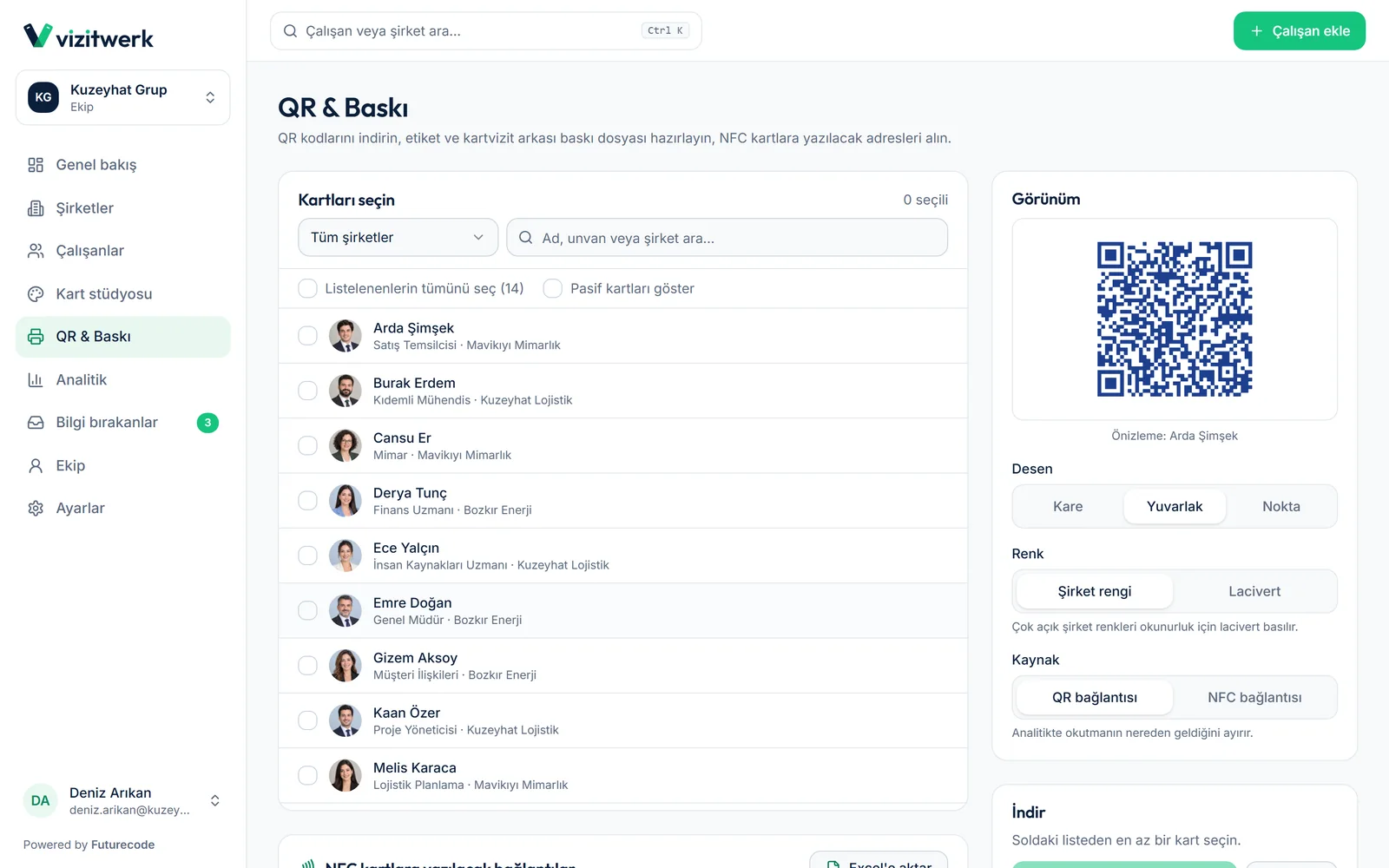
- Download the QR card images: Download QR codes or ready-made QR card images for each person in bulk, and prepare print files for badges, desk cards and stand panels.
- Write the NFC cards: If you use NFC cards, take each person’s card link from the panel and write it to the NFC cards. Print the QR code on the card too.
- Test on real phones: Try QR scanning, NFC taps, the “save contact” button and the contact form on different phone brands, in the office, before you reach the venue.
- Brief the team: Everyone on the stand should know the line: “Scan my card, it saves to your contacts in one tap; leave your details if you like and we will get back to you.”
At the Stand: Where QR Codes and NFC Cards Belong
A QR code only works at a trade show if visitors see it, can scan it easily and understand why they should. The main places for it on a stand:
- Name badge: A QR code on each person’s badge, pointing to their own card, makes “scan my card” a natural end to the conversation. The visitor gets the card of the person they actually spoke to.
- Desk and reception counter: A small standing desk card lets waiting visitors grab a card on their own while the team is busy.
- Stand panel and screen: For codes scanned from a little further away, use a large print or a screen. These usually show the card of a sales lead or the stand’s main contact.
- Back of the printed card: A QR code on the back links the printed card to the digital one.
- Phone screen: Team members can open their card on their own phone and let the visitor scan it, which also helps when a badge is forgotten.
A short call to action next to the code helps: “Scan to save my contact” or “Scan for the catalogue and contact details”. Whatever you promise should be on the card.
The NFC card is a fast alternative in face-to-face conversations: the visitor holds their phone near the card and it opens. Because NFC support and settings vary between phones, an NFC card should always carry a QR code as well.
In Vizitwerk, light, dark or logo QR card images for every employee are downloaded in bulk from the panel. As the product page puts it, you can use them on a fair stand, in an e-mail signature or on a desk, and the same QR keeps working when details change.
Collecting Visitor Details with Explicit Consent
The real value of a trade show is being able to reach interested visitors afterwards. With printed cards, that depends on collecting their card or jotting a note. With a digital card, the visitor can leave their own contact details through a form when they open your card.
This is personal data, so care is needed. Follow the data protection law that applies to you; in Turkey this is the Personal Data Protection Law No. 6698 (KVKK), and guidance is published by the Personal Data Protection Authority on its official website (kvkk.gov.tr). Please get legal advice for your own wording; in general these points matter:
- Privacy notice: Tell visitors clearly on the form who will use their details, for what purpose and how.
- Explicit consent: Leaving details should be the visitor’s own choice, made through a deliberate action rather than a pre-ticked box or implied agreement.
- Purpose limitation: Details collected so that you can “get back to them” should be used for that. If you want to use them for something else, such as marketing mailings, handle that separately.
- Data minimisation: Ask only for the fields you really need for follow-up.
- Access: Decide who can see and export the list of visitors who left their details.
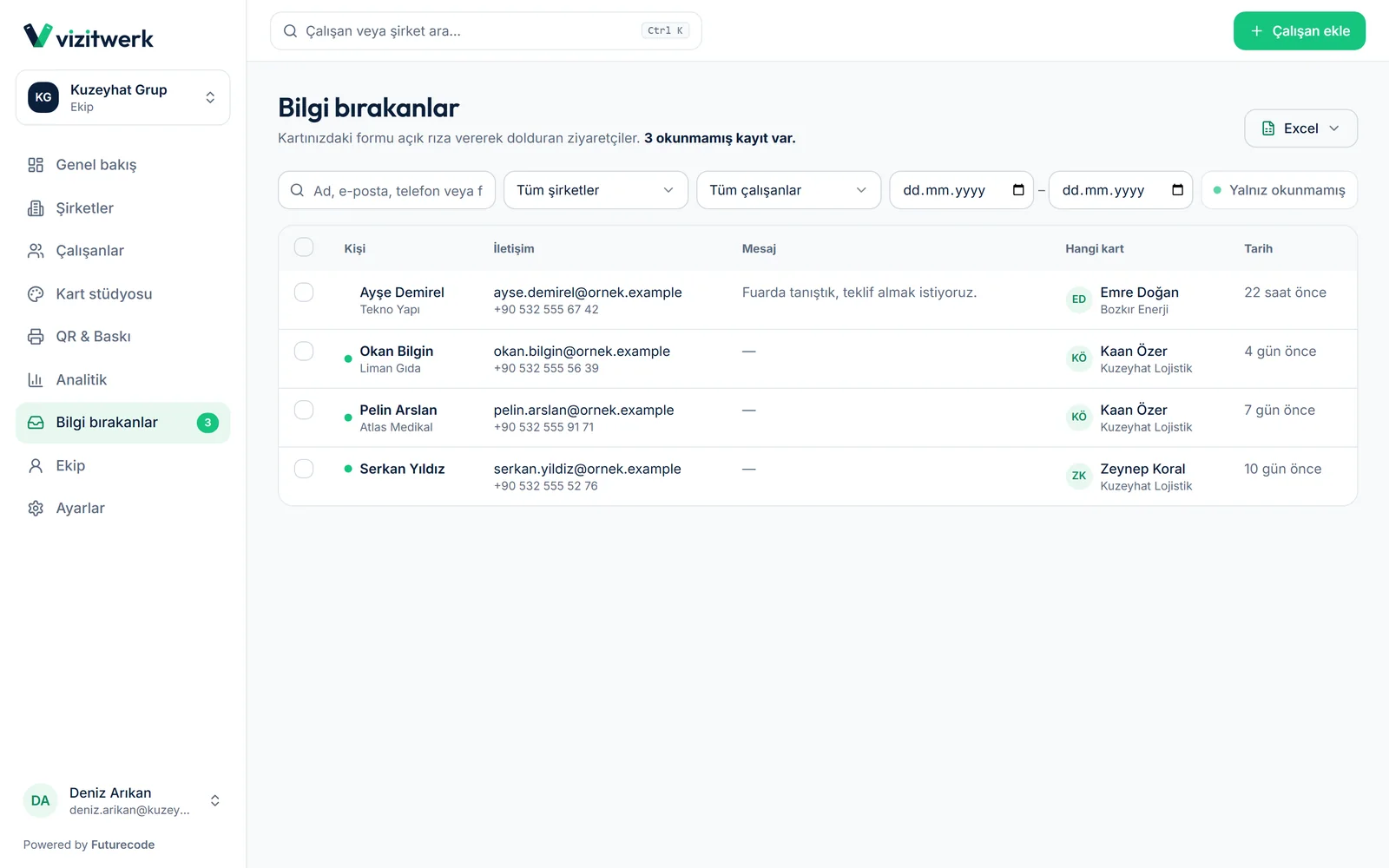
Vizitwerk’s contact form works only with explicit consent; people who leave their details appear in the panel as potential customers and the list can be exported to Excel. Panel access is split by owner, manager, editor and viewer roles. Visitor statistics do not store IP addresses; they are counted with an anonymous summary that changes daily. For the wider picture of data security in business software, see our article on enterprise software data security.
After the Show: Follow-Up and Measurement
A trade show pays off in the follow-up, not on the stand. Plan the follow-up before the show so you can get back to people while the conversation is still fresh.
Assign and follow up the leads
As soon as the show ends, export the list of visitors who left their details, assign them to the right salespeople and note who will contact each person and by when. You can bring the Excel list into whatever system you use to track customers. Mentioning what you talked about at the stand helps the visitor remember you among dozens of exhibitors.
How many views came from which source?
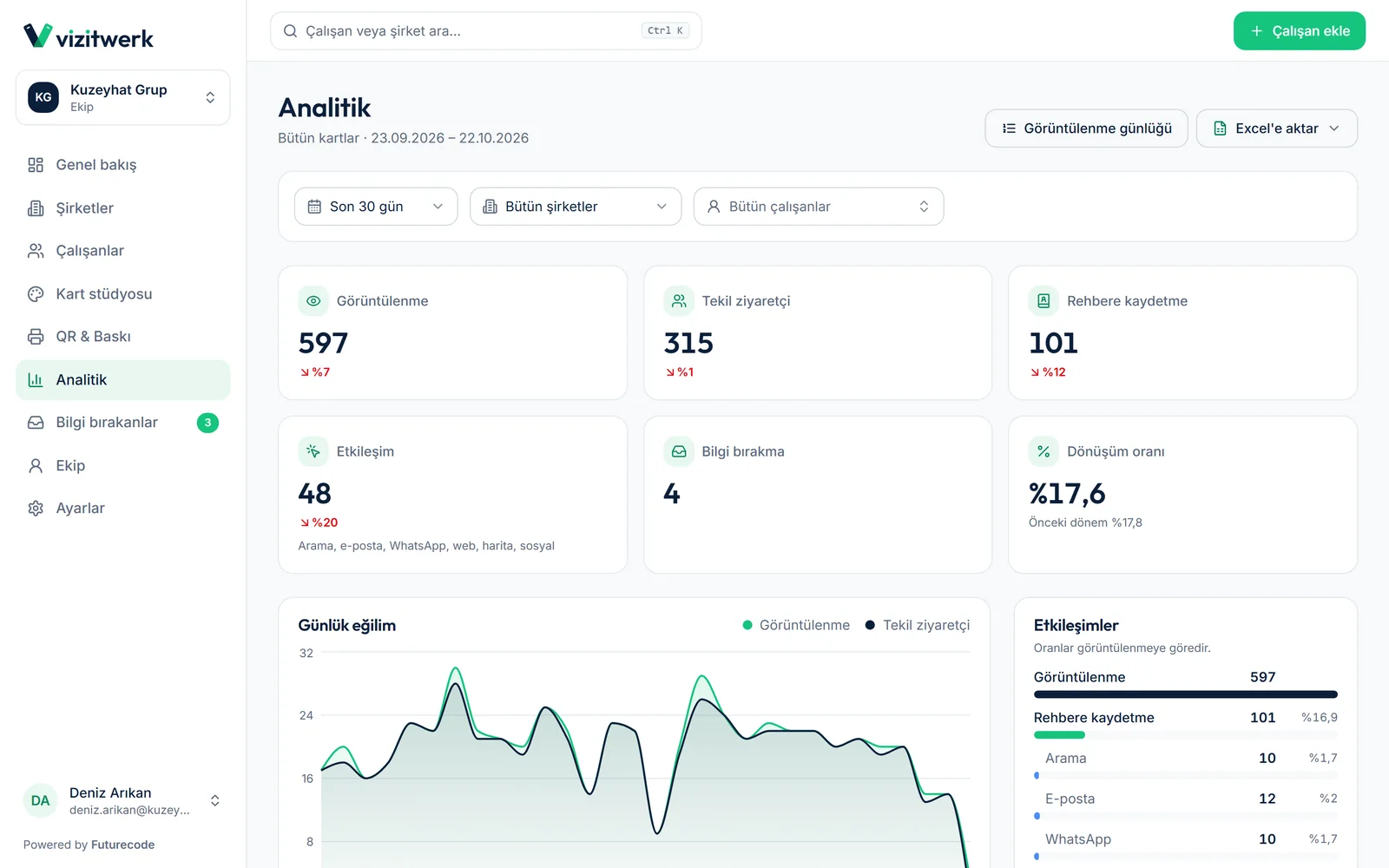
The clearest advantage of a digital card over a printed one is that it can be measured. Vizitwerk’s analytics screen shows views, unique visitors, saves to contacts, and call and WhatsApp clicks, broken down by source (QR, NFC, link) and device. The employees screen lists views for each person’s card. After the show, use this data to answer questions like:
- Whose card on the stand team was opened most, and who made the most contacts?
- Were QR codes or NFC cards used more, and are NFC cards worth ordering for the next show?
- How many of the people who opened a card saved it, called or sent a WhatsApp message?
If the trade show is part of a wider campaign, it makes sense to read this data alongside your other marketing results; see our performance marketing page.
Limits to Know
- Connectivity in the hall: A digital card is a web page, and mobile signal can be weak in crowded halls. Keep printed cards as a backup and test the connection at your stand area in advance.
- NFC does not work the same on every phone: Never take NFC cards to a show without a QR code on them.
- Source data does not separate locations: Analytics shows whether a visit came from a QR code, NFC or a link; if the same QR code is on your stand and in your e-mail signature, it will not tell those two apart. Keep that in mind when judging the show’s impact.
- Not everyone leaves their details: Because the form relies on consent, some visitors will only save your card. A polite reminder at the end of the conversation makes a difference.
- Software does not do the follow-up: The digital card collects and measures contacts; your team still has to get back to people.
Trade Show Business Cards with Futurecode
Futurecode is an Ankara-based team that builds business software and products. Teams handing out cards at fairs and events are among the users listed on the Vizitwerk product page: you prepare your stand team’s cards in one panel, get print-ready files for QR and NFC, and follow both the visitors who left their details and how the cards were used from the same place. No app is needed; the card opens in the browser on the visitor’s phone. For a demo or a quote ahead of your next show, get in touch with us.
For new guides and product news, follow Futurecode on LinkedIn.
Frequently Asked Questions
Do we still need printed business cards at a trade show?
It is worth keeping a small number. Some visitors expect them and hall connectivity can be weak. Put a QR code on the back and the printed card leads to the digital one too.
Do visitors need an app to scan the QR code?
No. Scanning the code with the phone camera or tapping the NFC card is enough; the card opens in the browser and the details save to contacts in one tap.
What if someone’s details change during the show?
The card is updated in the panel. Because the QR code carries the card’s address, printed badges and NFC cards keep showing the new details.
Do we need explicit consent to collect visitor details?
When you collect contact details from visitors you should inform them and collect the details through their deliberate choice. Vizitwerk’s contact form works only with explicit consent. Ask your legal adviser to review your own wording.
Can we see how many times the QR code on our stand was scanned?
Vizitwerk splits card views by source (QR, NFC, link) and lists views for each employee’s card. If the same QR code is also used outside the show, that number will not reflect the show alone.
We exhibit with several brands. Can we keep their cards separate?
Yes. Vizitwerk manages several companies from one account; each company has its own logo, colours and cover image, and employee cards pick these up automatically.