
Fixed Asset Physical Count: Year-End Steps, Discrepancies and QR Counting
A step-by-step guide to the year-end fixed asset count, from planning and team roles to the signed count report, discrepancies and register corrections, with a checklist and QR counting.

Short Answer
A fixed asset physical count is a hands-on check that every asset in your records is actually there, with the right person and in the condition the record says. A reliable count has four parts: a plan and a team agreed in advance, a count sheet taken from the asset register, a signed count report, and every discrepancy recorded with its cause. If your assets carry QR labels, scanning the label with a phone to open the record shortens the slowest part of the job, finding the item in your hand on a list; a QR-based register such as EDVO asset and assignment tracking supports exactly that.
Why and When to Count Fixed Assets
A register is only as accurate as the last time someone checked it. Over a year, devices change hands, teams move offices and faulty equipment is pushed into a cupboard, and not all of it reaches the record. A count brings those gaps to light and answers three questions: Is everything on the register actually there? Is everything that is there on the register? Are the custodian and condition on each record correct?
Year end is the most common time to count. As the financial year closes, finance wants the asset list to match physical reality. The rules on inventories and asset counts depend on where you operate and how your organisation is set up; in Turkey, for example, the Tax Procedure Law covers inventory and valuation in general terms, and public bodies follow their own regulation on movable property. Confirm what applies to you with your finance team or accountant.
Larger organisations often spread the count across the year, area by area, and only count what remains at year end. For the wider picture of asset tracking, see our related article: Fixed Asset Tracking: Moving from Spreadsheets to QR Codes.
The Count Plan and the Count Team
The quality of a count is decided before anyone walks the floor. Put the plan in writing and cover at least: the areas to count (sites, floors, rooms, stores), the asset categories included, the dates, how asset movements will be handled during the count, and who receives the discrepancy report.
Which roles does the team need?
- Count lead or committee: approves the plan, sets up the teams and signs off the final report. Public bodies and large organisations often give this role to a count committee.
- Count teams: ideally pairs, one person scanning or checking, the other recording. Two people reduce both errors and disputes.
- Area owner: someone who knows the area and can open locked cabinets and stores. They accompany the count but do not count their own area alone.
- Register owner: prepares the count sheet and posts corrections afterwards, working with finance where an accounting entry is needed.
The core principle is segregation of duties: the person responsible for an asset should not be the one who counts it. Otherwise the count is a declaration, not a check.
Year-End Physical Count, Step by Step
- Pull the count sheet from the register: list the assets in the area with number, category, make and model, serial number, location and custodian. Pull it on the day; counting against an old printout creates new discrepancies.
- Freeze movements, or log them live: pause new assignments, returns and moves during the count if you can. If you cannot, require every movement to be recorded immediately.
- Prepare labels and equipment: spare labels, a scanner or phone, and a printout or screen for signatures. Worn labels get replaced during the count.
- Count room by room: first check every asset you can see, then mark the items listed for that room that you have not seen yet. A small “counted” sticker on each item stops double counting.
- Confirm with custodians: laptops and phones may not be on the desk. See them with the employee, or get the employee’s confirmation.
- Note discrepancies on the spot: missing, unregistered, found elsewhere or with someone else, damaged or unused, each under its own heading.
- Sign the report: when an area is done, the team and the area owner sign the count report.
- Investigate and correct: find the cause of each discrepancy, get approval, update the register and hand the final report to the count lead.
Before, During and After: A Checklist
| Stage | What to check | Owner |
|---|---|---|
| Before | Written plan, areas and dates approved? | Count lead |
| Before | Teams of at least two, duties segregated? | Count lead |
| Before | Pending assignments, returns and transfers recorded? | Register owner |
| Before | Current count sheet pulled, spare labels ready? | Register owner |
| During | Every item checked and marked as counted? | Count team |
| During | Portable devices confirmed with custodians? | Count team |
| During | Worn or missing labels replaced? | Count team |
| After | Report signed for every area? | Team and area owner |
| After | Cause of each discrepancy written and approved? | Count lead |
| After | Register corrected and finance informed? | Register owner |
The Count Sheet and the Count Report
The count sheet is the working document you take onto the floor; the count report is the signed record of the result. Keep them apart: the sheet collects notes during the count, the report does not change once the count is closed.
What the count sheet should contain
- Asset number, category, make and model, serial number
- Location and custodian per the register
- Location and custodian as found (blank column)
- Condition: intact, damaged, unused (blank column)
- Notes: label replaced, found in another room, and so on
What the count report should contain
Date and area, the names of the count team, the number of assets counted, the list of discrepancies with a short explanation for each, and the signatures of the team and area owner. The report records the outcome and the exceptions, not every line; the detail stays on the sheet, attached to the report.
A count report does not replace an assignment form. If the count shows an asset is with a different employee, fix it with a new assignment or a transfer. We cover what an assignment form should include in Equipment Assignment Form: What It Is and What to Include.
Types of Discrepancy and What to Do
A discrepancy is any mismatch between the register and what you find. Not every discrepancy is a mistake; most point to a movement that never reached the record. What matters is to document each one with its cause and correct the register item by item, with approval.
| Discrepancy | Likely cause | What to do |
|---|---|---|
| On the register, not found | Moved to another area, out for repair, lost or stolen | Check other areas and service records; if still missing, report it and record the loss once approved. |
| Found, not on the register | Unrecorded purchase, donation or an old device returned | Trace its source with documents, register and label it, inform finance. |
| Wrong location | Room or site move never recorded | Update the location; if it keeps happening, introduce a rule for reporting moves. |
| Wrong custodian | Handover between employees never recorded | Record a transfer or new assignment and get a signed form. |
| Condition changed | Damage, fault or no longer in use | Update the condition; decide on repair, reuse or disposal. |
| Label problem | Worn, removed or printed twice | Match by serial number, relabel, merge duplicate records. |
Correcting the register
Corrections belong to an authorised register owner, not the count team, and each one should cite the count report. Changing an asset’s status and adding a note, rather than deleting the record, keeps the answer to “where did that device go?” a year later. Losses, write-offs and disposals that affect asset values may also need an accounting entry; agree the method with your finance team or accountant.
Counting with QR Codes and Barcodes
With a paper sheet, most of the time goes on reading an item’s number and hunting for it on the list. Labels shorten that step:
- Barcodes: quick to read, but usually need a dedicated scanner, and the number still has to be matched against a list.
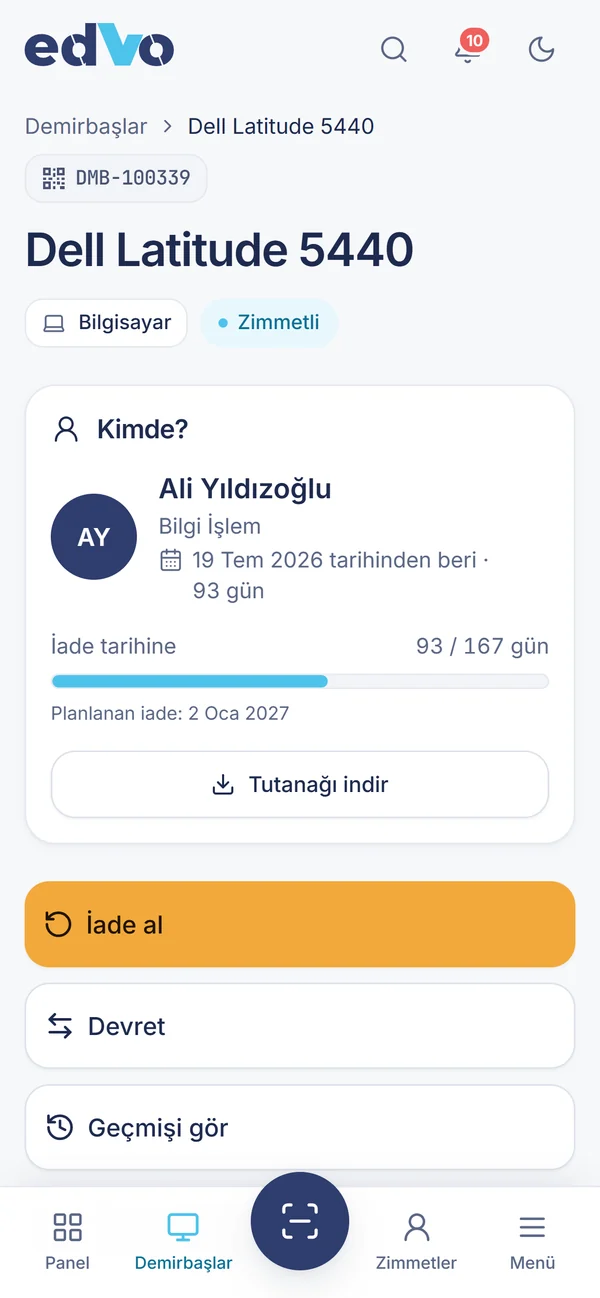
- QR codes: readable by any smartphone camera. If the label is linked to the asset record, scanning opens the record directly, with the current holder and history on one screen.
A practical flow with EDVO: export the “who holds what” report to Excel and hand it to the teams as the count sheet. On the floor, scan each QR label from the phone’s browser, with no app to install; the asset card opens with its current holder, history and service records. Then post the discrepancies you marked: a transfer for a wrong custodian, a return recorded as intact, lost or damaged for items confirmed missing or found damaged, and a new record with a QR label for anything unregistered. Count notes can be added to the asset card.
Preparing for Next Year
The real payoff of a good count is an easier next one. Before closing, note down:
- Recurring discrepancy types: mostly wrong locations, or wrong custodians? That tells you which movement is not being recorded and which process to fix.
- Recording habits: logging assignments, returns and transfers as they happen does more than anything else to shrink year-end discrepancies.
- A labelling standard: decide where labels go for each category so nobody has to hunt for them next time.
- Cycle counts: counting high-value or frequently moved categories during the year lightens the year-end load.
- One home for documents: keep reports, sheets and the final summary where next year’s team can find them.
Getting Count-Ready with Futurecode
Futurecode is a business software team based in Ankara. EDVO is our web application for asset and assignment tracking: assets are registered with category-specific fields, the system generates QR labels, and Excel handles bulk import and export. Assignments, bulk returns and transfers are recorded with signed forms attached; reports show who holds what, overdue returns, category distribution, utilisation and cost. Role-based access and an audit log make it clear who corrected what after a count. EDVO runs in the cloud or on your own server, for organisations with 20–2000 staff.
If your count and inventory process does not fit an off-the-shelf product, we also offer custom software development. For a demo or a conversation, get in touch.
For new guides and product news, follow Futurecode on LinkedIn.
Frequently Asked Questions
How many people does a physical count need?
Count each area with a team of at least two: one checks or scans, the other records. The person responsible for an area should not count it alone.
What happens when the count finds a discrepancy?
Identify the type, investigate the cause and write it in the report. Once approved, correct the register: update the location, record a transfer, post the loss or damage, or register an unrecorded item. Talk to finance about anything that affects asset values.
Is a count report the same as an assignment form?
No. An assignment form records handing an asset to a person; a count report records the result of a check in one area on one date, along with any discrepancies.
Is a year-end count a legal requirement?
It depends on your jurisdiction, your type of organisation and how you keep your books, and public bodies often have their own rules. Confirm with your accountant or finance team.
Do we need an app to count with QR codes?
That depends on the system. With EDVO, you scan the QR label from the phone’s browser without installing an app, and the asset card opens.