Digital Business Cards with QR Codes: A Practical Guide for Companies
A digital business card with a QR code never needs reprinting and saves to contacts in one tap. Here is how it works, how to create one step by step and how companies manage every employee's card from one place.
Short Answer
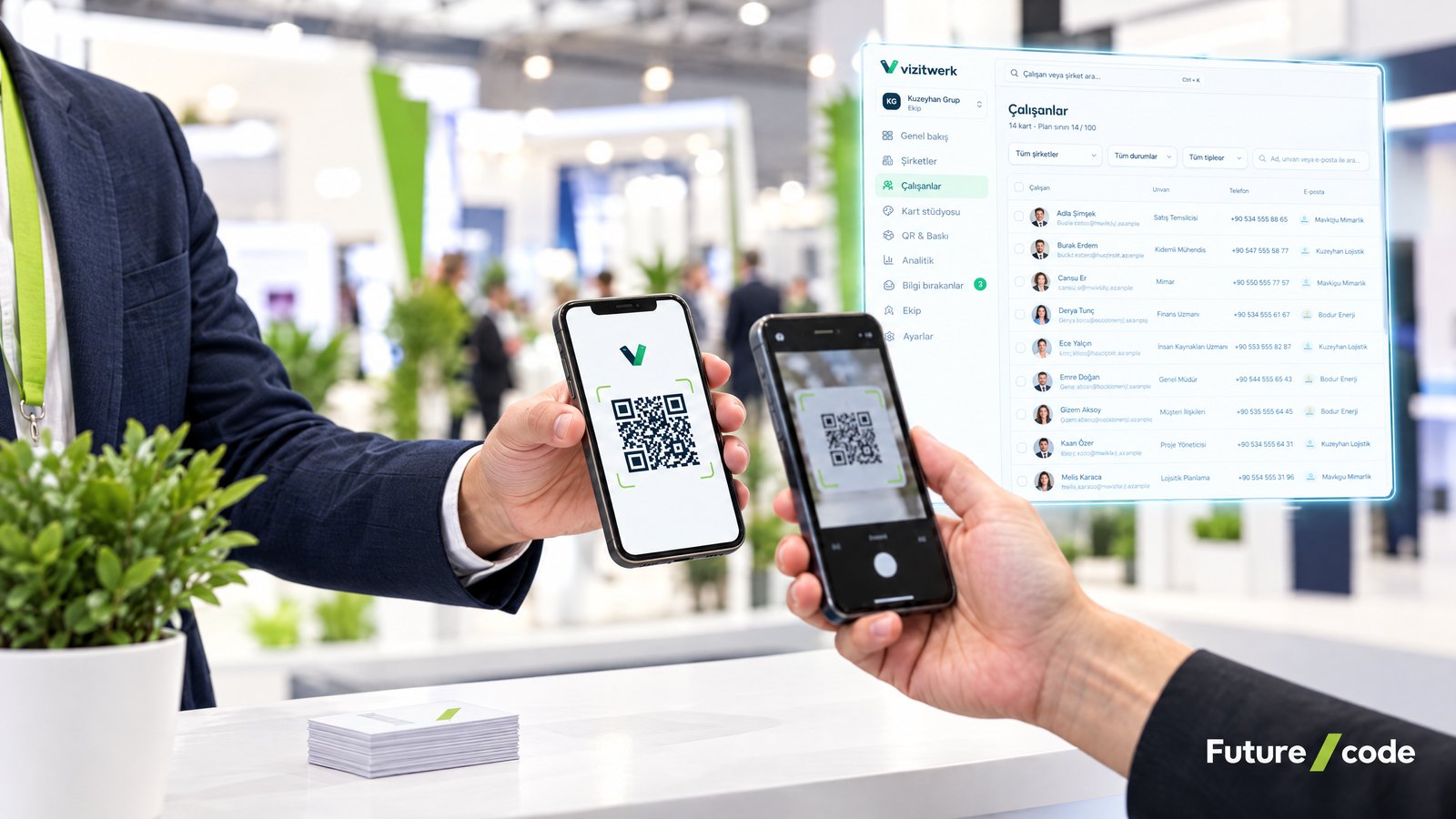
A digital business card with a QR code presents your contact details on a small web page that opens on a phone, and people reach that page by scanning a QR code or tapping an NFC card. The card opens in the phone’s browser; calling, e-mailing or messaging takes one tap, and the details can be saved to contacts as a vCard. When your details change, nothing needs reprinting, because the QR code points to the card and the card is simply updated. For companies, Futurecode’s Vizitwerk digital business card platform lets you design, manage and measure every employee’s card from one panel.
How Does a Digital Business Card Work?
At the heart of a digital business card is a small, mobile-friendly web page for each person, showing their name, title, company, phone, e-mail, address, website and social links. There are three common ways to share it:
- QR code: The card’s address is turned into a QR code that can go on a printed card, a badge, a trade fair stand, an e-mail signature or a phone screen. Scanning it opens the card.
- NFC: The card’s address is written to an NFC-enabled card or tag. Holding an NFC-capable phone near it opens the card.
- Link: The address is shared directly by message, e-mail or social media.
The other person does not need to install an app; the card opens in the phone’s browser. A “save contact” button hands the details to the phone as a vCard file, so nobody has to type them in.
One detail matters a lot: the QR code holds the card’s address, not the contact details themselves. When a phone number or title changes, the card is updated and the printed QR code keeps working, now showing the new details. With “static” codes that embed the details directly, every change means a new QR code and a new print run.
Paper vs Digital Business Cards
| Topic | Paper business card | Digital business card with QR code |
|---|---|---|
| When details change | Redesign and reprint; old cards are thrown away | Update the card; the same QR code keeps working |
| Saving to contacts | The recipient types everything in by hand | Saved in one tap as a vCard |
| Space for content | Limited by the card’s size | Room for social links, map location, website and promotional links |
| Distribution | Handed out in person; stock runs out | QR, NFC, link, e-mail signature; unlimited sharing |
| Measurement | No idea whether the card was useful | Views, saved contacts and calls can be tracked |
| Brand consistency | Each print run may look a little different | Logo, colours and templates applied centrally |
| When someone leaves | Cards already handed out cannot be recalled | The card can be updated or switched off centrally |
| Internet needed | No | The recipient needs a connection to open the card |
| In-person impression | Tangible; still expected in some industries | Works alongside a printed QR card |
How to Create a Digital Business Card, Step by Step
Whether it is one card or several hundred, the basic steps are the same:
- Collect the details: Name, title, work phone, e-mail, address, website and the social accounts you want to show. For a team, a spreadsheet is the easiest starting point.
- Set the brand look: Logo, company colours, cover image and typeface, defined at template level so every card carries the same identity. If your visual identity is not settled yet, a UI design and visual identity project first will make this easier.
- Use dynamic QR codes: Make sure the QR code carries the card’s address rather than the details, so printed codes survive any change.
- Create the card and test it on phones: Open it on different devices and try the call, e-mail, WhatsApp and “save contact” buttons.
- Prepare the sharing materials: Download the QR images and place them on printed cards, badges, e-mail signatures and fair materials. If you use NFC, write the card addresses to the NFC cards.
- Review data and privacy settings: Decide which details appear on the card, how visitor statistics are kept and, if you use a lead form, the wording of its consent text.
- Assign an owner: Write down who updates cards when people join, change roles or leave.
Company Use: Managing Every Card from One Place
A personal digital card takes minutes to set up. The real difference shows when you manage cards as a company. Sales, field and management teams often end up with scattered print orders, mismatched designs and cards with outdated titles. A central panel brings this together:
- Bulk creation: Upload the staff list from Excel and create cards in one go.
- One identity: Logo, colours and cover are set at company level and flow down to every employee card. Groups with several brands give each company its own identity.
- Change management: When a title or phone number changes, the card is updated in the panel; printed QR codes stay valid.
- When someone leaves: Paper cards handed out by a former employee keep circulating. A digital card can be updated or retired centrally. Good practice is to point a departing employee’s card to the company’s general contact details or switch it off, so customers do not end up calling a number nobody answers.
- Permissions: Roles separate who can edit cards from who can only view them.
Vizitwerk is built for these needs. Several companies and hundreds of employees are managed from one account, with bulk import and export through Excel. In the card studio you edit cards with 5 templates, 4 themes and 12 typefaces and watch the phone preview update live. Employee cards sit in one list with their QR code, views and status, and owner, admin, editor and viewer roles keep permissions clear.
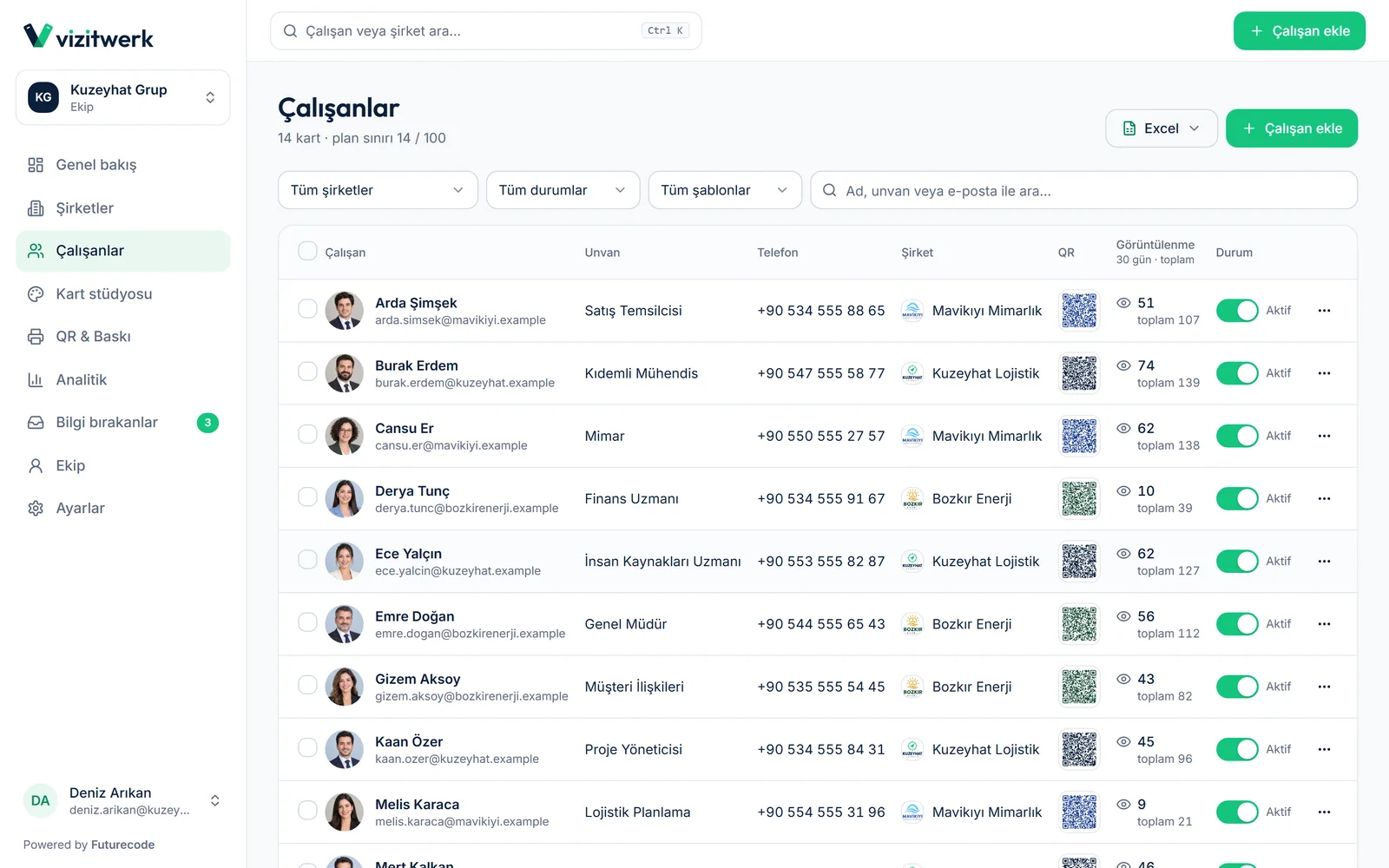
In Vizitwerk you can download QR codes, or ready-designed light, dark or logo QR card images, in bulk and export print files. The analytics screen shows views, unique visitors, saved contacts, call and WhatsApp taps, broken down by source (QR, NFC, link) and device. A lead form lets visitors leave their contact details with explicit consent; they appear as leads in the panel and can be exported to Excel. If you want those leads to flow into your sales process, our CRM software guide is a good next read.
vCard and NFC: What to Know
What is a vCard?
vCard is a standard file format for contact details such as name, phone, e-mail, address and organisation; files usually end in .vcf. The format is defined by the IETF in RFC 6350, and phone contact apps and e-mail clients recognise it. The “save contact” button on a digital card produces this file, and opening it adds the details to the address book. In Vizitwerk, whoever opens the card can save your details in one tap as a vCard.
How does an NFC business card work?
NFC (near-field communication) is a wireless technology that works over a few centimetres. On an NFC business card, the small chip usually stores the address of the digital card. When an NFC-capable phone with NFC switched on comes close, that address opens. The card has no battery; it draws its power from the phone.
In practice, not every phone handles NFC the same way, and some people keep it switched off. Printing a QR code on the NFC card as well means the card opens on any phone. In Vizitwerk, the links to write to NFC cards come from the panel, and visits from NFC show up separately in analytics.
Privacy and Data Protection
Digital business cards involve personal data, both your employees’ and that of the people who view the cards. Which rules apply depends on where you operate: in Turkey the framework is the Personal Data Protection Law (KVKK), with guidance published by the Personal Data Protection Authority; in the EU it is the GDPR. Take legal advice for your own case; in general, pay attention to the following:
- Employee data: Agree with each employee which details appear on their card. If a personal number is used instead of a work one, discuss it openly.
- Transparency: Prepare a notice explaining to employees and visitors why their data is processed.
- Visitor analytics: Do not collect more than you need for statistics. Vizitwerk does not store visitor IP addresses; statistics are counted with an anonymous digest that changes daily.
- Lead forms: If you collect contact details from visitors, make sure it is based on consent. The Vizitwerk lead form works only with explicit consent.
- Departing employees: Make taking a former employee’s personal details offline a standard step in your offboarding.
We cover the wider picture of data security in business software in this article.
Limits to Know
- An internet connection is needed: The card is a web page, so the recipient’s phone needs a connection. Details saved to contacts stay available offline.
- NFC behaves differently across phones: Keep a QR code on NFC cards as a fallback.
- Paper may not disappear completely: In some industries and meetings a printed card is still expected. A printed card carrying a QR code covers both.
- Cards need upkeep: A digital card is only as good as its last update. If nobody owns the updates, digital cards go stale just like paper ones.
Digital Business Cards with Futurecode
Futurecode is a software and product team based in Ankara, Turkey. If you want your team’s business cards in one panel, Vizitwerk is the place to start: design cards once, scale them as the team grows and update them from the panel as details change. If you have a specific need, such as connecting card data to your existing systems, we can look at it through our custom software development service. For a quote or a demo, get in touch.
For new guides and product news, follow Futurecode on LinkedIn.
Frequently Asked Questions
Does the recipient need an app to open a digital business card?
No. The card opens in the phone’s browser; scanning the QR code with the camera or tapping the NFC card is enough.
If my details change, do I need to reprint the QR code?
Not with a dynamic QR code. The code points to the card, the card is updated, and the same code shows the new details. Vizitwerk works this way.
Which is better, QR or NFC?
They are not rivals. A QR code works on almost any phone with a camera and can sit on screen, paper or an e-mail signature. NFC is quick in person but depends on the phone’s support and settings. The most reliable approach is an NFC card that also carries a QR code.
What happens to a card when an employee leaves?
In a centrally managed system the card is updated or retired from the panel. Pointing it to the company’s general contact details is good practice, so customers do not call a number nobody answers.
We run several companies. Can we manage their cards separately?
In Vizitwerk, several companies are managed from one account. Each has its own logo, colours and cover image, and employee cards pick them up automatically.
How do we bring in our existing staff list?
In Vizitwerk, download the Excel template, fill it in and upload it; the cards are created in bulk.