
What Is a B2B Dealer Ordering Portal? Stop Taking Dealer Orders by Phone
Collecting dealer orders by phone, WhatsApp and spreadsheets costs more as you grow. Here is how a B2B dealer ordering portal works, what it should include and how to move your dealers onto it.

Short Answer
A B2B dealer ordering portal is a web-based ordering system that a manufacturer or distributor opens to its dealers: each dealer signs in with their own account, sees their own prices and current stock, and places orders themselves. It replaces orders collected by phone, WhatsApp and e-mail, along with the re-keying, wrong prices and promises made on stock that is not there. Futurecode’s Stokwerk dealer portal is built for exactly this: it checks the stock file coming from your ERP, opens a catalogue with dealer-specific prices and turns incoming requests into orders once you approve them.
The Problem with Phone, WhatsApp and Spreadsheet Orders
As a dealer network grows, orders arrive through more and more channels. One dealer calls, another sends a photo on WhatsApp, a third e-mails a weekly spreadsheet. The sales team gathers these messages and types them into the ERP or into their own sheet. It works at a small scale. As volume grows, the same problems keep coming back:
- Endless stock questions: A dealer cannot order without first asking “do you have it?”. Every question is a call, and every call comes out of the sales team’s day. By the time the answer is given, stock may already have changed.
- Wrong prices: When prices differ by region, dealer or quantity, knowing which list applies depends on people’s memory. Old PDF price lists keep circulating.
- Re-keying errors: Every order copied from a message into a system can end up with the wrong product code or quantity. Mistakes are often noticed only after shipping.
- No visibility on order status: “Has my order shipped? What is the invoice number?” creates a second wave of calls.
- No trail: Who ordered what, at which price and when is scattered across chat histories. Building a sales report becomes a separate job.
- Dependence on individuals: When the sales rep who knows the dealers is on leave or moves on, the order flow slows down.
The common thread: the information (stock, prices, status) already exists on your side, but it only reaches the dealer through a person. A dealer portal removes that bottleneck, and your sales team can spend its time on dealer relationships and new accounts instead of typing orders.
How Does a B2B Ordering Portal Work?
A B2B ordering portal differs from a consumer online shop in a few important ways. Not everyone sees the same price; the price depends on the dealer who is signed in. An order is often not final the moment it is placed; quantities, shipping and dispatch dates are confirmed by the seller. Payment usually runs on trade terms such as account credit, bank transfer or payment terms rather than a card at checkout.
A typical flow looks like this:
- The dealer signs in with their own account.
- They search the catalogue and see their own price and the stock status.
- They add products to the basket and choose a delivery address and shipping option.
- The basket reaches the seller as a request.
- The seller confirms quantities and shipping and converts the request into an order.
- The dealer follows the order status (open, shipped, cancelled) and invoice details in the portal.
Behind the scenes, stock data is the most critical part. The closer the portal’s stock is to what is really in the warehouse or the ERP, the more dealers will trust it. That is why how stock reaches the portal, and how often, should be one of the first questions you ask when choosing a dealer portal.
What a Dealer Portal Should Include
The table below lists the capabilities generally expected from a dealer portal and how each one appears on the Stokwerk product page. Rows marked “Not stated on the page” may still matter for your business; raise them before any rollout.
| Need | Why it matters | In Stokwerk |
|---|---|---|
| Dealer-specific pricing | Each dealer sees only their own terms; no outdated lists in circulation | Yes: price lists by region and dealer |
| Quantity or pallet pricing | Encourages bulk orders and avoids calculation errors | Yes: pallet prices apply automatically once the pallet quantity is reached |
| Stock visibility | Cuts down “do you have it?” calls | Yes: live stock badges in the catalogue |
| Stock data checks | A faulty file never shows dealers the wrong stock | Yes: stale, partial or duplicate files wait for approval; every changing row is shown first |
| Fast product search | Dealers find the right item quickly | Yes: search by code or EAN; size, season and brand filters |
| Request and approval flow | Quantities and shipping stay under the seller’s control | Yes: confirm or reduce requested quantities, add shipping |
| Order status tracking | Ends the “where is my order?” calls | Yes: open, shipped and cancelled orders; invoice numbers |
| Status notifications | Dealers learn about changes without asking | Yes: dealers are notified of every status change |
| Working with Excel | A transition that does not break current routines | Yes: export orders to Excel, upload invoice and tracking numbers back |
| Multilingual interface | For dealers abroad | Yes: Turkish, English, German |
| Direct, real-time ERP integration | No manual handling of stock and orders | Not stated on the page: stock arrives as an ERP file (FTP folder) or a manual Excel upload |
| Online payment in the portal | For dealers who pay upfront | Not stated on the page: bank details are shown for payment |
| Credit limits and payment terms | Trade terms visible to the dealer | Not stated on the page |
Read the table against your own priorities. A distributor that sells on prepayment may treat online payment as essential; a manufacturer working on payment terms will usually care far more about correct prices and reliable stock.
Moving from Phone Orders to a Portal, Step by Step
Switching to a dealer portal is less a software installation than a change of habits. This sequence helps you move without pushing dealers away:
- Map the current flow: Which channels do orders come through, who picks them up, where are they recorded, who approves them? Take one week of orders and trace their path. A process and workflow design exercise helps here.
- Clean your product data: Every product needs a unique code and, where available, an EAN. Matching the stock file to the catalogue depends on these codes; duplicates and missing codes surface at this stage.
- Define your price structure: Which dealer belongs to which list, are there regional differences, how are quantity or pallet prices calculated? Turn the exceptions people keep in their heads into written rules.
- Decide on the stock source: In what format and how often can your ERP export stock? Will the file be dropped into a folder automatically or uploaded by hand? This decision sets how current the portal’s stock will be.
- Start with a pilot group: Pick a few dealers who order often and are comfortable with technology. Use their questions to refine screens and rules.
- Write the rules down: How quickly are requests approved, how is shipping added, can dealers request items that are out of stock? Give dealers a short portal guide.
- Narrow the phone channel gradually: For a while both channels run side by side. When an order comes in by phone, the sales team can enter it in the portal and show the dealer how to do it next time.
- Measure and improve: Track the share of orders placed through the portal, approval times and the steps where dealers get stuck most.
A Dealer Portal with Stokwerk
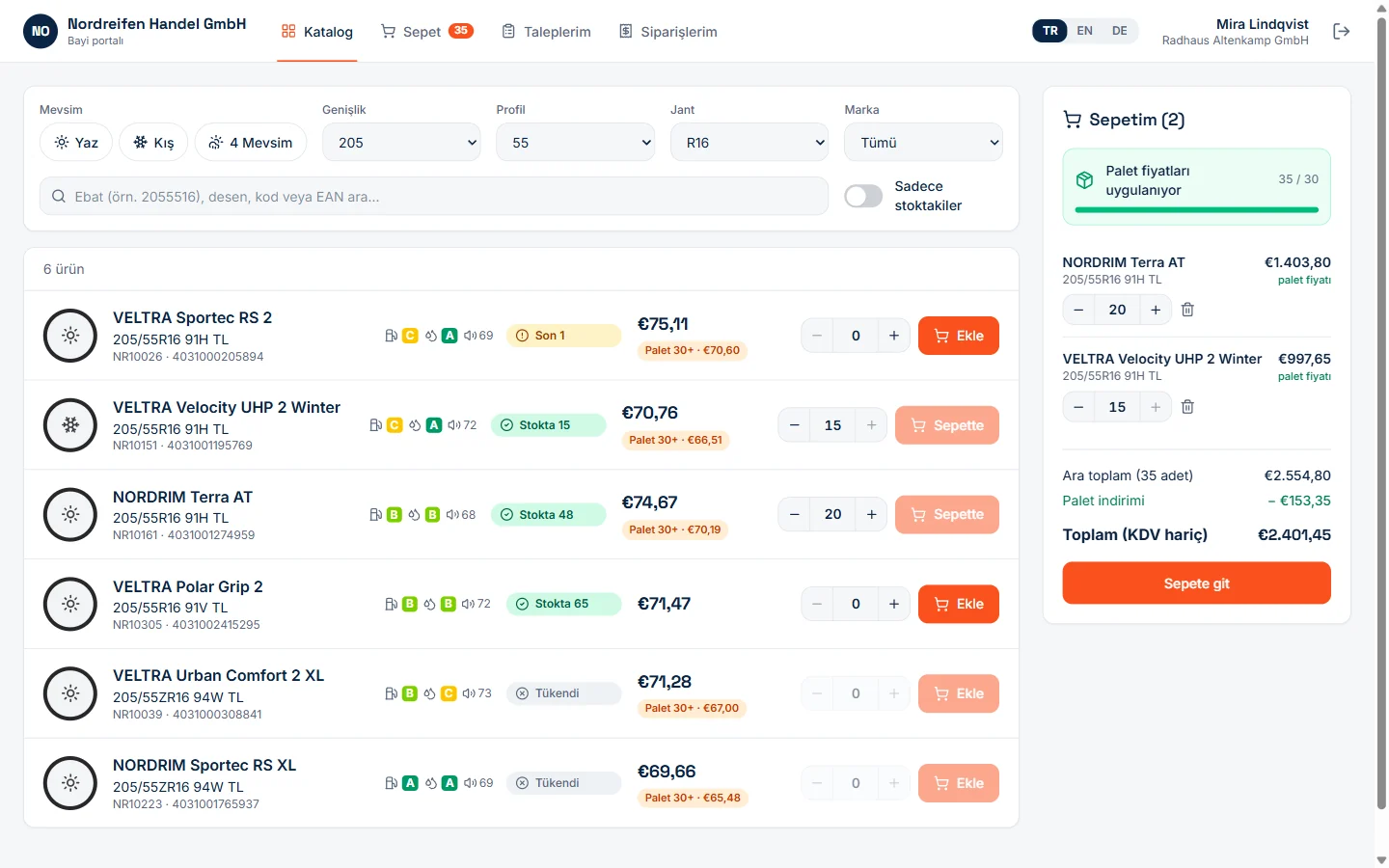
Stokwerk is a web-based B2B dealer portal for manufacturers and distributors. On the dealer side, each dealer signs in with their own account and sees only their own price list. They search the catalogue by code or EAN, narrow it down with filters and see live stock badges. They turn the basket into a request by choosing a delivery address and shipping, then follow open, shipped and cancelled orders, invoice numbers and bank details for payment in the portal.
On your side there is one back office. Stock files awaiting approval, open requests, the state of each stock source and a weekly request chart sit on one dashboard. You confirm or reduce the quantities a dealer asked for, add shipping and convert the request into an order in one click. Price lists are kept by region and dealer, and unit and pallet prices can be edited inline.
What sets Stokwerk apart is how it treats the stock file. The ERP file arrives through an FTP drop folder or a manual upload; Stokwerk reads every file before applying it, matches rows by product code and EAN, and shows every line that will change. If the file is older than expected, the row count is low or many products would drop to zero at once, auto-apply stops and waits for your approval. The same file is never processed twice, and rows without a catalogue match are listed separately. A faulty file never reaches your dealers.
Limits to Know
- ERP connection is file-based: Stokwerk takes stock from a file produced by your ERP or from an Excel upload. If you need a direct, real-time data link to your ERP, that is a separate integration project; our guide What Is API Integration? explains what it involves.
- Catalogue structure: The product page describes the catalogue as ready for tyres (size, season and EU label filters). For other product groups, the filters you need should be agreed during pilot planning.
- A new product: Stokwerk is preparing its first deployments. Rollouts are planned as a pilot around your dealer network and your ERP file format.
- A portal alone does not change habits: If price and stock data are messy, or the sales team keeps taking phone orders, dealers will not switch. The rollout plan matters as much as the software.
Working with Futurecode
Futurecode is an enterprise software team based in Ankara, Turkey, building both ready products and company-specific systems. If you want to bring dealer orders into one place, we can plan a Stokwerk pilot with you. If your process does not fit a ready-made portal, for example because you need custom approval chains or a direct ERP connection, we can look at it as part of our custom software development service. We compare the two routes in Custom Software vs Off-the-Shelf. To talk it through, get in touch.
For new guides and product news, follow Futurecode on LinkedIn.
Frequently Asked Questions
How is a B2B dealer portal different from an online shop?
In an online shop everyone sees the same price and an order is final once paid. In a dealer portal the price depends on the dealer who is signed in, orders are often confirmed by the seller, and payment runs on trade terms such as account credit, bank transfer or payment terms.
Do dealers need to install an app?
Not with a web-based portal; dealers sign in from a browser. Stokwerk is web-based: both the dealer portal and the back office run in the browser.
How up to date is the stock in the portal?
It depends on how often stock data reaches the portal. In Stokwerk, stock comes from a file your ERP drops into an FTP folder or from a manual Excel upload, so the portal is as current as the files you send.
Can each dealer see different prices?
Yes. In Stokwerk, price lists are set by region and dealer, and each dealer sees only their own list. Pallet prices apply automatically once the pallet quantity is reached.
What if a dealer orders the wrong quantity?
In Stokwerk, an order first arrives as a request. You confirm or reduce the quantities, add shipping and then convert it into an order.
Can dealers outside Turkey use it?
The Stokwerk interface is available in Turkish, English and German.


